MalShark: MCP-Powered Malware Traffic Analysis — Benchmarked Against Real Malware
If you’ve ever had to analyze a suspicious pcap file, you know the drill — open Wireshark, start writing tshark filters, hunt through thousands of packets, manually correlate DNS queries with TLS SNIs, and try to figure out which IP is actually the C2 and which is just Apple’s CDN. It’s tedious, it requires deep expertise, and one wrong filter means you miss the IOC.
MalShark is my attempt to change that. It’s an MCP (Model Context Protocol) server that wraps tshark and exposes a suite of malware analysis tools directly inside Cursor or any MCP-compatible AI client. You drop a pcap file, describe what you want in plain English, and the AI runs the right tools, chains the results, and gives you a structured forensic report.
The best part: every detection rule in MalShark was written and tuned against real malware samples from malware-traffic-analysis.net — not synthetic test cases. The project has a benchmark suite where each tool version is scored blind against ground-truth IOC files before any rule is added or changed.
Source Code: github.com/MohitDabas/malshark
What is MCP?
The Model Context Protocol is an open standard that lets AI clients (Cursor, Claude Desktop, Windsurf, Continue, and others) call external tools through a defined interface. Instead of the AI reasoning about what a tshark command might produce, it actually calls the tool and gets structured results back.
This makes MCP the right primitive for security tooling: the AI doesn’t hallucinate packet data, it reads real output from the actual tool.
Architecture
MalShark is built entirely on asyncio. Each tool fans out multiple tshark processes in parallel using asyncio.gather, so a single extract_iocs call runs 6 tshark passes simultaneously — DNS queries, TLS handshakes, HTTP requests, HTTP responses, C2-on-443 detection, and SYN-only unreachable C2 detection — all at once.
AI (Cursor / Claude / Windsurf)
        │  MCP
        ▼
  MalShark Server (FastMCP)
        │  asyncio.gather
        ▼
  ┌─────────────────────────────────────┐
  │  tshark pass 1: DNS queries         │
  │  tshark pass 2: TLS SNI             │
  │  tshark pass 3: HTTP requests       │  ← all parallel
  │  tshark pass 4: HTTP responses      │
  │  tshark pass 5: C2-on-443           │
  │  tshark pass 6: SYN-only C2         │
  └─────────────────────────────────────┘
        │
        ▼
  Structured IOC Report
The Toolset
| Tool | What it does |
|---|---|
pcap_summary |
High-level overview: victim IP, protocol breakdown, top IPs by bytes, red flags |
extract_iocs |
DNS, TLS SNI, HTTP, C2-on-443 (non-TLS traffic on port 443), unreachable C2 |
c2_beaconing |
Burst-cluster timing analysis — detects regular callback intervals |
find_downloads |
File downloads (HTTP) and large outbound uploads; HTTPS large-transfer estimates |
extract_credentials |
Cleartext credentials + malware-specific custom auth headers to bare-IP C2s |
http_sessions |
Full HTTP request/response pairs with cloud C2 pattern detection |
detect_dns_tunneling |
Entropy analysis, label length distribution, tunneling scoring |
capture_packets |
Live packet capture from a network interface |
Recommended Workflow
Run these in order — each step narrows the scope for the next:
1. pcap_summary          ← always start here; get victim IP + red flags
2. extract_iocs          ← DNS, TLS SNI, C2-on-443, unreachable C2
3. c2_beaconing          ← run on each suspicious IP from step 2
4. find_downloads        ← what did the victim download or send out?
5. http_sessions         ← full HTTP detail, cloud C2 patterns
6. extract_credentials   ← any auth material in cleartext?
7. detect_dns_tunneling  ← if DNS looked odd in step 2
With Cursor (or any MCP-compatible AI), you can run the whole chain in one message:
“Analyze put_pcap_here/capture.pcap — find the victim IP, extract all IOCs, check for beaconing on any suspicious IPs, and tell me what the malware downloaded.”
Benchmarked Against Real Malware
This is where MalShark earns its credibility. Every tool version is validated using a strict blind-test methodology:
- Run tools blind — tools run on the pcap with zero prior knowledge of the IOCs
- Load ground truth — IOC files and malware artifacts from the official ZIP are read after
- Score each tool — true positives, false positives, and misses documented
- Apply justified fixes — only changes that generalise across multiple samples get committed
- Document everything — findings written up in
benchmarks/
Here are two real benchmark results.
Sample 1: macOS Shub Stealer (2026-05-08)
Infection chain: Victim searched for cracked software → Google Drive lure → ClickFix command → curl pipes loader.sh directly to zsh → downloads payload.applescript → osascript installs persistence as com.google.keystone.agent (masquerading as Google Keystone updater).
Running extract_iocs blind:
The tool fired on all four malware domains before any ground truth was consulted:
[DNS]  7 domains queried  (7 flagged)
  ⚠ socvy.com                         t=18.7s   SUSPICIOUS
  ⚠ shoeboxthen.com                   t=19.4s   SUSPICIOUS
  ⚠ orbitlinkgrid6.cyou               t=21.2s   SUSPICIOUS suspicious_tld
  ⚠ ploesglodigigachads.com           t=98.6s   SUSPICIOUS
  ⚠ api.ipify.org                     t=438.8s  SUSPICIOUS

[C2-443]  1 IP using port 443 WITHOUT TLS/SSL
  ⚠ 172.67.203.61  240 non-TLS pkts on :443

[C2-UNREACHABLE]  1 IP — many SYN attempts, server never responded
  ⚠ 172.67.74.152  8 SYN attempts with no response
Running c2_beaconing on 172.67.203.61 (ploesglodigigachads.com):
  Mean interval     : 72.453 s
  Median interval   : 60.708 s
  Dominant interval : 57.6 s
Checking the ground truth persistence plist afterward:
<key>StartInterval</key>
<integer>60</integer>
The dominant beacon interval matched the LaunchAgent StartInterval of 60 seconds exactly — detected blind, confirmed by ground truth.
Result: 6/6 network-observable IOCs detected.
Sample 2: SmartApeSG ClickFix → NetSupport RAT (2026-05-22)
Infection chain: SmartApeSG fake browser update page → ClickFix PowerShell → dropper binary → NetSupport RAT callback using an embedded headless Chrome browser.
extract_iocs caught:
- The SmartApeSG lure domain in DNS
- The dropper download host flagged in HTTP sessions
- Two NetSupport RAT C2 IPs in C2-on-443
- One offline backup C2 server via SYN-only unreachable detection
c2_beaconing confirmed the RAT’s characteristic irregular but persistent call-home pattern.
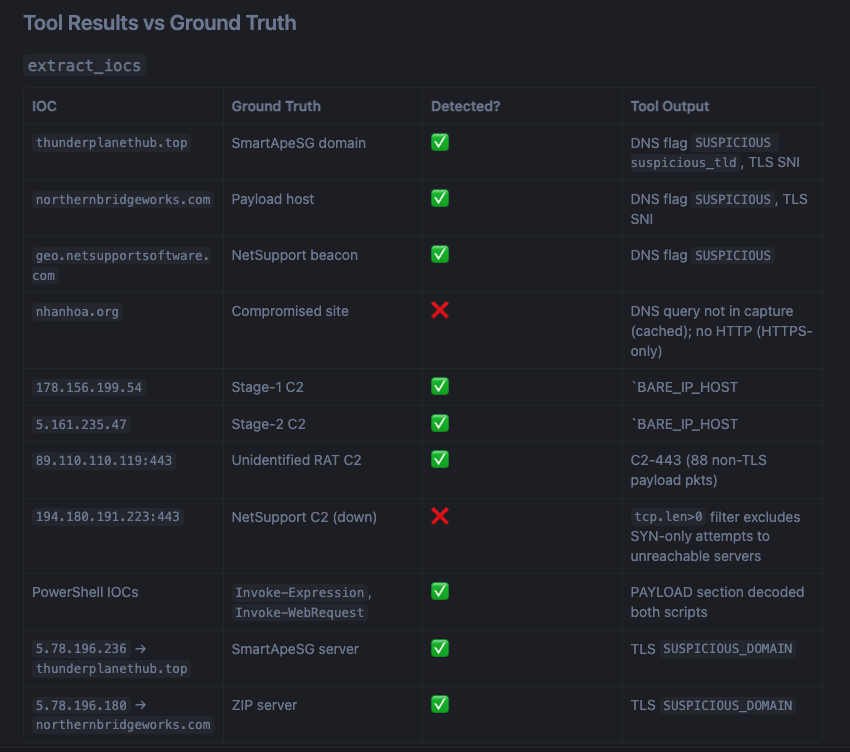
Here’s the full tool results vs ground truth breakdown for this sample:
Result: 87% detection coverage.
What Benchmarking Fixed
Running tools against real malware surfaces gaps that you’d never catch in testing. Every fix below was driven by a real sample:
C2-on-443 flood with handshake noise — the initial C2-on-443 detection was counting TCP SYN/ACK packets with no payload, inflating the result from 2 real C2 IPs to 18. Fixed by adding tcp.len > 0 to the filter.
Offline C2 servers missed — a NetSupport RAT backup C2 was unreachable during capture (server was down), so no TLS handshake, no HTTP, nothing. Fixed by adding a SYN-only detection pass: if the victim sent 5+ SYN packets to a port 443 IP with no session ever establishing, that IP is flagged as a likely offline C2.
SNI-based false positive suppression — Apple CDN and Microsoft Update IPs were triggering C2-on-443. Fixed by building a map of IPs → their TLS SNIs and excluding any IP whose SNI resolves to a benign domain.
Malware-specific custom auth headers — the loader script sent JSON telemetry to the C2 with custom fields like build_hash and is_cis. Normal credential extraction only looks for Authorization: headers. Added detection for non-standard auth-style headers sent to bare-IP C2 servers.
Installation
Requirements: Python ≥ 3.11, tshark installed and on PATH.
# Install tshark
sudo apt install tshark          # Debian/Ubuntu
brew install wireshark           # macOS

# Clone and install
git clone https://github.com/MohitDabas/malshark
cd malshark
pip install uv
uv sync
Add to Cursor (or any MCP client)
In Cursor → Settings → MCP → Add server:
{
  "mcpServers": {
    "malshark": {
      "command": "uv",
      "args": [
        "--directory",
        "/absolute/path/to/malshark",
        "run",
        "wireshark-mcp"
      ]
    }
  }
}
Drop your pcap into the put_pcap_here/ folder and you’re ready.
Conclusion
MalShark is an attempt to bring AI-native tooling to network forensics — not by replacing tshark, but by making it accessible through a structured, benchmarked interface that an AI can call reliably.
The benchmark-driven development approach is what I’m most proud of. Every detection rule has a real malware sample behind it, and every false positive reduction has been validated not to blind-spot a real IOC. The project is open to contributions — if you find a malware sample where MalShark misses something or produces noise, open an issue and I’ll benchmark it.
GitHub: github.com/MohitDabas/malshark