Linux Malware Development: Fileless Execution with memfd_create and Python
Fileless execution is a common technique used in modern malware to evade traditional antivirus and Endpoint Detection and Response (EDR) solutions that rely on scanning files written to disk. In the Linux ecosystem, one of the most effective ways to achieve this is by using the memfd_create system call.
In this blog, we’ll explore how to execute an ELF binary directly from memory using Python, completely bypassing the disk. We’ll also look at this from a defender’s perspective to understand how modern EDRs log and detect this behavior.
Note: This post is inspired by the excellent blog post In-Memory-Only ELF Execution by MagisterQuis.
What is memfd_create?
Introduced in Linux kernel 3.17, memfd_create allows a program to create an anonymous file that lives entirely in RAM. This file behaves like a regular file (you can read, write, and execute it), but it never touches the physical disk. Because it lacks a traditional file path, legacy security tools that monitor file system events (like inotify) often miss it entirely.
Once the payload is written into this memory-backed file, we can execute it by calling execve on the magic symbolic link found in /proc/self/fd/<fd_number>.
Python Implementation: memfd_exec.py
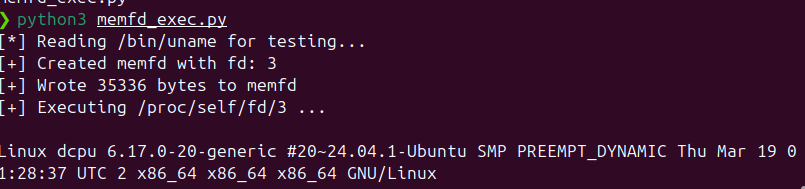
Below is a pure Python implementation of this technique. We use Python’s built-in os.memfd_create (available in Python 3.8+) to allocate the memory file, write an ELF binary into it, and then execute it.
Source Code: The script for this post can be found on GitHub:
memfd_exec.py. For this and other Linux malware development topics, check out the full Linux_Malware_Development repository.
import os
import sys

def run_elf_from_memory(elf_bytes: bytes, argv: list):
    """
    Executes an ELF binary from memory using memfd_create.

    :param elf_bytes: The raw bytes of the ELF binary.
    :param argv: The argument list (argv[0] should be the program name).
    """
    # 1. Create an anonymous file in RAM
    # We use flags=0 to avoid MFD_CLOEXEC, as having it set can sometimes
    # interfere with execve reading the file via /proc/self/fd/N
    try:
        fd = os.memfd_create("anonymous_elf", 0)
    except AttributeError:
        print("[-] os.memfd_create not available. Requires Python 3.8+")
        sys.exit(1)

    print(f"[+] Created memfd with fd: {fd}")

    # 2. Write the ELF bytes to the file descriptor
    # We use closefd=False so the fd stays open
    with open(fd, 'wb', closefd=False) as f:
        f.write(elf_bytes)
        print(f"[+] Wrote {len(elf_bytes)} bytes to memfd")

    # 3. Execute the binary via the procfs magic link
    fd_path = f"/proc/self/fd/{fd}"
    print(f"[+] Executing {fd_path} ...\n")

    # 4. execve replaces the current process with the new one
    # Note: We pass the environment variables as well.
    os.execve(fd_path, argv, os.environ)

if __name__ == "__main__":
    # Example: Run /bin/uname from memory
    target_bin = "/bin/uname"

    print(f"[*] Reading {target_bin} for testing...")
    try:
        with open(target_bin, "rb") as f:
            elf_data = f.read()
    except Exception as e:
        print(f"[-] Failed to read {target_bin}: {e}")
        sys.exit(1)

    # We pass the arguments we want the executed binary to receive
    args = ["uname", "-a"]

    run_elf_from_memory(elf_data, args)
Code Walkthrough
os.memfd_create("anonymous_elf", 0): This system call requests the kernel to allocate an anonymous file in memory. We name itanonymous_elf. We pass0for the flags soMFD_CLOEXECis not set. IfMFD_CLOEXECwas set, the file descriptor would close during execution, causing ourexecveto fail.- Writing the Payload: We open the file descriptor in write-binary mode (
'wb') and write our target ELF bytes (in this case,/bin/uname) into RAM. /proc/self/fd/{fd}: The Linux kernel exposes file descriptors for every process via theprocfs. Even though our memory file isn’t on disk, the kernel provides a path to it here.os.execve(): Finally, we execute the path. This replaces our Python process with the target ELF binary.
Defensive Perspective: EDR Logging and Detection
While memfd_create successfully bypasses disk-based scanning, it is not invisible to modern EDRs or auditing tools (like Auditd, Sysmon for Linux, Falco, or Tetragon).
To start the process, the kernel still has to execute the execve system call. Modern EDRs hook directly into kernel system calls (often using eBPF) and capture all process execution events.
What does the EDR see?
When our Python script calls execve, the EDR captures the arguments. Here is what the telemetry looks like:
-
The Executable Path: Because it is a memory-backed file unlinked from the filesystem, the EDR resolves the executable path to something like:
Executable: /memfd:anonymous_elf (deleted)(The kernel prependsmemfd:and appends(deleted)). -
The Command Line (argv): The command line logged is exactly what we passed in the
argsarray in Python:Command Line: uname -a
A Typical Log Event
A SIEM or EDR alert generated by this script will look similar to this JSON payload:
{
  "event_type": "Process Execution",
  "parent_process": "/usr/bin/python3 memfd_exec.py",
  "executable": "/memfd:anonymous_elf (deleted)",
  "command_line": "uname -a"
}
Why this triggers immediate alerts
From a threat hunting perspective, this telemetry is incredibly noisy and is considered a massive red flag:
- Execution from memory: Legitimate applications rarely execute binaries out of
/memfd:or/proc/*/fd/(with a few exceptions like systemd or flatpak). This path alone is a high-confidence indicator of fileless malware. - Process Spoofing (Mismatch): The EDR will instantly notice the mismatch. The command line says
uname -a, but the binary being executed is not/bin/uname; it’s a deleted memory file. This mismatch is a classic signature of evasion. - Anomalous Parent Process: Python suddenly spawning a child process that lives in memory is highly suspicious behavioral telemetry.
Conclusion
While memfd_create is an elegant way to avoid writing payloads to disk, defenders with robust kernel-level visibility will easily spot the anomalous execve patterns it generates.